
Enterprise Architect version 15.2


My Profile
Help
Hot Topics
Top Community Contributors
Social Media Channels


Bert Dingemans
I am an independent (data) architect and EA consultant working often with enterprise architect mostly for UML class diagrams and ArchiMate 2.0. I am using enterprise architect for generating documentation, XSD files and modelling enterprise architectures with ArchiMate 2.0. I have developed an Open Source Web Publication Platform for EA. I also participate in Eaxpertise.nl. You can reach me at [email protected]
Enterprise Architect Usergroup Event in Benelux
The last live Enterprise Architect (Sparx) User Group event took place in 2018. It is therefore time for an update with an “old school” event, on 23 and 24 January 2025. For Enterprise Architects, both starting and more experienced EA Sparx users. You are therefore cordially invited to this Benelux EA User Group event. The event will take place at Schiphol airport in the Netherlands well accessible via car and public transport!
WHAT?
Although we are busy organizing behind the scenes, we can sketch a global outline.
• The set-up is somewhat similar to the Sparx Systems Global Summit last September.
• For example, Thursday 23 January is full of workshops and training for both entry-level Sparx users and more experienced Sparx users for in-depth sessions.
• Friday 24 January is filled with shorter presentations and room for personal presentation, interaction and questions.
CALL FOR SPEAKERS!
When you are willing to contribute to this event we would like to invite you to do a presentation at this two day event. There are two days in the event with the following setup:
- Educate a half-day workshop/training session: scheduled on Thursday 23rd (that is: four hours, in the morning or afternoon, including a coffee break).
- Present ‘A regular Sparx topic or customer's experience’; duration 45 minutes, scheduled on Friday 24th (*).
- Please indicate the level of users’ participants you want to address to (starter, medium, expert).
To engage participants even further and to announce you properly, please provide us with a brief abstract of your session/workshop, your LinkedIn profile and your professional photo via: EAUG Proposal wizard .
COSTS
We deliberately keep the prices low. For € 527,-- you will receive a Passe-partout for two full days of tool training, inspiration and strengthening networks. You can also attend one day.
RESERVATIONS
For more information or to book directly, go to: http://www.sparx-benelux.eu. Registration is now very attractive due to the temporary 15% discount.
QUESTIONS
If you have any questions after reading this email, please let us know. Send your question to This email address is being protected from spambots. You need JavaScript enabled to view it. or call 06-10148933 (Han).
And yes, of course we appreciate it if you inform other users (or send us their contact details)
We look forward to your arrival and..
don't forget to register: www.sparx-benelux.eu
Extending the ArchiMate metamodel in Enterprise Architect
Introduction
ArchiMate is an open standard for modeling enterprise architecture. ArchiMate is a modeling language and has a close relationship with the architectural framework Togaf. This combination means that ArchiMate has been introduced by many organizations, both commercial, non-profit and government institutions in the Netherlands and other countries. In addition, ArchiMate modeling is powerfully supported in Sparx Enterprise Architect.
In this article we discuss expanding the ArchiMate modeling language. Not for introducing new concepts but by adding properties to elements and relationships in the language. This is part of the metamodel in ArchiMate open standard and offers organizations the opportunity to register c features of the organization-specific enterprise architecture in close connection with the concepts in the language.
ArchiMate metamodel
ArchiMate is a rich modeling language with about sixty elements and twelve relationships. This makes it possible to model all aspects of an organization and its environment. In some situations, ArchiMate is seen as too rich for specific goals and target groups. ArchiMate has also introduced a mechanism for this and described it in detail. Namely views and viewpoints.

Image metamodel
This means that ArchiMate's metamodel closely matches the needs of many organizations, ranging from just the open standard to making extensions in the language for the benefit of their own organizational needs.
ArchiMate in Enterprise Architect
Enterprise Architect supports multiple modeling languages such as UML, BPMN, BABoK. ArchiMate is also well supported in Enterprise Architect. In addition, more and more mechanisms of the ArchiMate language have been implemented. This includes extensions in addition to the ArchiMate diagrams such as the toolbox, working method for the ArchiMate viewpoints and the option to view viewpoints using the model wizard and then generate an initial view based on the viewpoint.

Image ArchiMate in EA
Since version 16 of Enterprise Architect, it has also been easy to restrict the metamodel for elements and relationships. This makes it possible to limit the language in elements, relationships, diagrams and quick linkers for certain user groups. A nice functionality for organizations that want to use a limited set of the ArchiMate language to simplify the language for the various stakeholders.
ArchiMate also describes expanding the language with properties. If you want to make organization-specific extensions, that is possible. There are also functionalities available in Enterprise Architect that support this. The MDG technology builder in particular has the option to expand the language with elements and relationships with their own properties. This allows you to introduce your own modeling language. In itself a powerful functionality, but also with a major disadvantage. You introduce a new modeling language based on ArchiMate, but IN ADDITION to ArchiMate. In many situations this is not desirable.
In this article I will therefore introduce a method that makes it possible to introduce organization-specific properties within the ArchiMate language without creating a new modeling language. For this we use an example based on the description available on the website with the ArchiMate standard (see the useful links below).
Combine functionalities in Enterprise Architect
As mentioned, you can use the MDG Technology builder to expand the metamodel for a language. This functionality uses the Tagged Values concept in the background. This functionality makes it possible to extend the Enterprise Architect data model.
To expand the ArchiMate language, we can suffice with the use of Tagged Values. The description of the ArchiMate language does mention specializations of concepts. However, if we look at the description, we see that no new mutual connections arise. New specializations can therefore be developed using Tagged Values.
You can elaborate these Tagged Values within the UML types, but they can also be used for ArchiMate. What is powerful is that a script can be defined for a Tagged Value. This allows us to set additional behavior and conditions for the different Tagged Values. In the image below you see the screen where you can define the Tagged Values in combination with the result in the tags of an element. I'll use a simple naming convention here. The name of the Tagged Values all start with ArchiMate. I will come back to this later.

Image: Tagged Values
We can now easily expand the model based on the stereotypes and the tagged values without having to introduce new stereotypes. This means that the ArchiMate metamodel remains available unchanged and we can continue to exchange ArchiMate models based on the AMEF exchange format.
However, there is a functionality missing that makes the modeler’s life easy. A bottleneck with the tagged values is that the tagged values have to be added manually via the property screen. This is repetitive and slowing down when working with your own tagged values.
Fortunately, there is something that can be done about that. In Sparx Enterprise Architect you can catch events that occur in Enterprise Architect via a (model-based) add-in. This also applies to a context changed event. This means that if the context changes to another element or another connector, a command is executed. You can then use the Enterprise Architect API to check whether all tagged values are present for a certain stereotype and, if not, create these tagged values for the element or connector.
This functionality has been realized in the IDEA Add-on. In the settings of the IDEA addon you can prefix which tagged values should be created. In our case this is ArchiMate as a prefix, then the IDEA addon is used based on the handling of an event in EA. In the image below you can see the piece of software that underlies this within the IDEA AddOn. If you want to create a model-based add-in yourself, you can do so based on the code in the example below.
Public Shared Function DefaultTaggedValues(Element As EA.Element, _
Repository As EA.Repository) As Boolean
Dim Tag, oTV As EA.TaggedValue
Dim oDef As New IDEADefinitions()
Dim Prefix As String
Dim oPT As EA.PropertyType
Dim strPTTag As String
Dim strNames As String = ";"
Try
Prefix = oDef.GetSettingValue("TaggedValuePrefix")
If Prefix.Length > 0 Then
For Each oTV In Element.TaggedValues
strNames += oTV.Name + ";"
Next
For Each oPT In Repository.PropertyTypes
Dim blnCreateTag As Boolean = False
strPTTag = oPT.Tag.ToString()
If strNames.Contains(strPTTag) Then
blnCreateTag = False
Else
If strPTTag.Contains(Prefix) Then
If oPT.Detail.ToString().Contains("BaseStereotype") = False And _ Element.Stereotype.Length > 0 Then
blnCreateTag = True
End If
If (oPT.Detail.ToString().Contains("BaseStereotype") And _
oPT.Detail.ToString().ToUpper().Contains(Element.Stereotype.ToUpper())) Then
blnCreateTag = True
End If
If oPT.Detail.ToString().Contains("AppliesTo=" + Element.Type) Then
blnCreateTag = True
End If
If blnCreateTag Then
Tag = Element.TaggedValues.AddNew(oPT.Tag, "")
Tag.Update()
End If
End If
End If
Next
Element.Update()
Return True
Else
Return False
End If
Catch ex As Exception
DLA2EAHelper.Error2Log(ex)
End Try
Return False
End Function
Source code
I have created an example for the combination of the tagged values and the IDEA, including a short video on how this can be achieved.
Summary
This whitepaper describes how you can extend the ArchiMate metamodel with properties. In Sparx Enterprise Architect this is possible with the tagged value functionality. In addition, the IDEA AddOn describes how repetitive and slow work for the modeler can be automated. With this we introduce a powerful method to extend the ArchIMate metamodel without having to introduce new stereotypes into the model. Particularly for organizations that see working based on open standards as an important requirement.
Useful Links
Book, online training and sample repository about an Architecture Repository
Introducting an Architecture Repository is an opportunity to professionalize the architecture modeling process and products. There a publication is prepared for supporting an approach for introducing Sparx Enterprise Architect as An Architecture Repository. This book focuses on introducing an architecture repository. An architecture repository contributes to a more mature approach to introducing architecture into an organization. This is a combination package of a book, online training and a sample repository.

The book, training and sample repository are prepared based on the following subjects
- Document driven approach as baseline architecture
- Architecture Repository as target architecture
- Solution architecture for the transfer from baseline to architecture
- Step by step guides
- Aids for successfully introducing an architecture repository
The combination package is available from Leanpub. Please follow the link where you see some sample pages of the book and a sample video of the online training. For more information please visit:
https://leanpub.com/architecturerepository
The sample repository included in the combination package is used to write the book, a nice example of the power of Sparx Enterprise Architect and an approach also know as "Eat you own Dogfood". However it gives you an option to make a jumpstart in introducing an architecture repository.
Derived relationships and nesting in ArchiMate applied with Helpers in Sparx Enterprise Architect
Resume
ArchiMate is a powerful enterprise modelling language for the architect's expressiveness. As a result, ArchiMate is sometimes experienced as complex. However, there are a number of parts in the metamodel that can simplify the views.
In this white paper, we discuss two forms of simplification, namely nesting of elements to simplify the visual representation. In addition, working with derived relationships to reduce the complexity in a diagram.
Both forms of simplification are supported in Sparx Enterprise Architect. However, with two extra routines in the IDEA Addon, the modeller is automatically supported in implementing changes in the model and validating whether these transformations comply with the rules in the ArchiMate metamodel
Introduction
ArchiMate is a powerful language with several dozen concepts, elements and relations. This gives the architect expressiveness to express an architectural elaboration. For architects among themselves, ArchiMate is important as a language with a rich vocabulary. However, this also has a number of drawbacks. The main disadvantages are that the language is experienced as difficult for a number of stakeholders.
Fortunately, a number of concepts have been added in ArchiMate that allow for a simplification of the language with a relatively small limitation in expressiveness. Two of these simplifications are nesting elements to simplify that way. The other set-up is to work with derivative relations. However, both simplifications are included in the meta model and are structured in the language.
In this white paper we discuss these two simplifications with a number of helpers in the IDEA addon for Sparx Enterprise Architect. In these helpers, the simplifications based on the meta model are automatically supported. A nice dimension is that this also offers possibilities to validate the model in accordance with the rules that apply to these simplifications.
The helpers are within the IDEA addon under the ArchimAid functionality. In this article we will discuss this functionality. The addon is available as open source and can be downloaded from https://data-docent.nl/IDEANL.aspx#gsc.tab=0. In addition, a web video has been created to demonstrate the functionality of ArchimAid.
Nested elements
Archimate perspective
In ArchiMate, a large number of elements can be related to each other. In that case, a diagram will soon be regarded as quite full and well-organized for the reader. Consider, for example, hierarchical structures such as representing the organizational structure or the classification of information objects divided into domains. Below is an example of a diagram that shows a simple hierarchy.
This diagram can be greatly simplified by using nesting. Nesting places the child elements within the parent element. In the example, therefore, a nesting is created twice. See below
This makes the classification easier to interpret, even for stakeholders without in-depth ArchiMate knowledge.
The metamodel does, however, impose some restrictions on this method. Nesting is mainly used for structural relationships and for specializations. In addition, it is desirable to include in your own modelling convention that only the same relationship is used in a nested elaboration. So no combination of, for example, composition and aggregation or specialization in one diagram, then it is no longer possible to deduce which relations have been used.
Sparx Enterprise Architect implementation
In Sparx Enterprise architect the design of nesting is adequately implemented. If you connect two elements and then place one inside the other, the connector will be made invisible as expected, provided you choose the relationship types defined in ArchiMate that allow nesting.
The bottleneck in this, however, is that if you do not create a connector between two elements in advance and apply nesting, there will be no notification that a connector based on ArchiMate is relevant. In one diagram it goes well, but in the repository and in other diagrams it is not clear that there should be a relationship. The ArchimAid is helpful here.
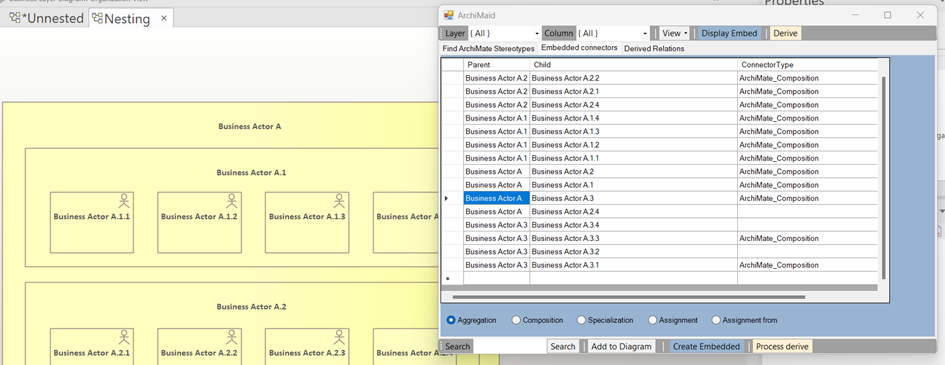
ArchimAid Helper
The ArchimAid helper is a screen in the IDEA addon that supports the ArchiMate modeller. This way you can easily search for ArchiMate stereotypes, layers and aspects. However, the Embed tab provides an overview of the connectors that are there, including the stereotypes, or not.
You can then use the Create Embedded button to create the connectors based on the selected stereotype to create the connectors. See also the web video that shows how create embedded works.
Derived relationships
Archimate perspective
Do you work part of an the enterprise in ArchiMate in detail, you see that a model emerges that has many elements and relationships. This provides a level of detail that is most expressive for the community of architects. However, these detailed elaborations are too complex for other stakeholders. Compare it with the construction world where the specifications are relevant for this target group. However, the future residents can suffice with an artist's impression of the house to be built.
Within ArchiMate it is possible to simplify the model by using derived relations. In the image below you can see an example of this. Instead of a diagram consisting of several elements and relationships, a new relationship is established between two elements. The other elements can then be removed.
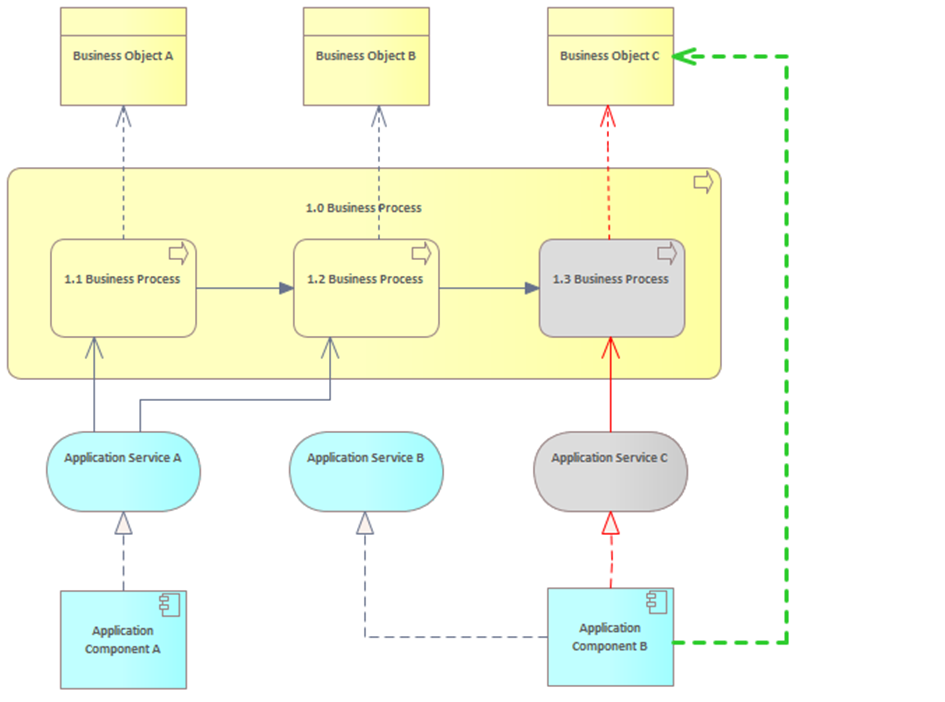
This diagram shows the simplification by establishing a derivative relationship between two elements. The elements that can be removed as a result are colored grey. If desired, you could remove a few more elements if this simplifies the model.
Sparx Enterprise Architect implementation
Sparx Enterprise Architect offers you the freedom to establish relationships based on the meta model. This also supports the addition of derived relationships. However, this is an activity that must be performed manually by the modeler.
An additional challenge is that the modeller must be aware that adding a derivative relationship to one diagram can also have an effect on other diagrams on which the elements both occur.
ArchimAid Helper
The ArchimAid functionality does support the modeller automatically in determining derived relationships. You can see an example of this on the screen. You choose a start and end entity and determine based on the ArchiMate metamodel rules which relationship arises as a derived relationship. This can be done via multiple paths through the model. You will see it in the diagram.
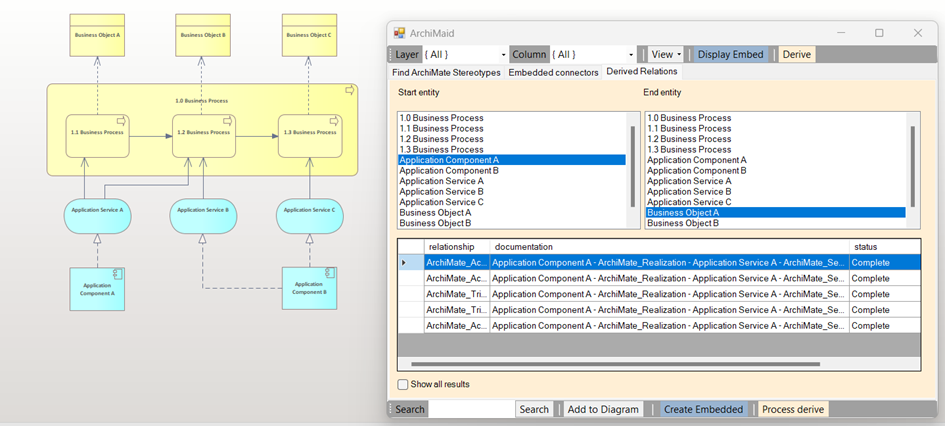
Then, in the list of possible simplifications, you can choose the paths you want to replace with the simplified relation. The other relationships are then made invisible in the chart, not from other charts. See the web video with an interactive example.
More information
For more information about the IDEA ArchimAid screens please visit the following online content:
- https://youtu.be/7gogT2O2Kf8
- https://data-docent.nl/ideaen.aspx#gsc.tab=0
- https://youtu.be/mkFNc6MCZq8
- https://community.sparxsystems.com/white-papers/1355-using-archimate-viewpoints-in-nterprise-architect
- https://data-docent.nl/frmSearchList.aspx?module=webcontent&mode=direct&searchfor=idea#gsc.tab=0
Online Enterprise Architect training courses at Tutorialspoint
At the TutorialsPoint online training platform there are now three training courses available. These courses consist of the following subjects:
- Introduction to Sparx Enterprise Architect an introduction of the basic functionalities in Enterprise Architect. You learn how to use this modeling tool in your daily activities
- Integreated Data Entity Add-In for Enterprise Architect (IDEA). An open source extension for the data modeler and data architect to support data modeling activities in Enterprise Architect.You learn how to install, configure and use this Add-In
- Open source webviewer for Enterprise Architect the Web Publication Platform. You learn how to install and use this webviewer and how to connect it to a repository via a database connection.

To get an overview of the various online courses at TutorialsPoint you can start at the profile page on TutorialsPoint. For all these trainingcourses a number of videos can be previewed to give you an idea of the content of this training. Please notethat there are also anumberof extra classroom trainings available both in Dutch and English at bertdingemans.nl .
All these course give you the opportunity to get an introduction in the functionalities of Enterprise Architect with these online courses al a very low price from your laptop, desktop or tablet at every moment of the day you want and from every place where you want like couch, chair, bed, bath or gardenseat.
Online training about Data Modeling in Sparx Enterprise Architect available on Udemy
There is a new online training available about Information and Data Modeling on Udemy. In this training we use Sparx Enterprise Architect to create the various data models. Think about Conceptual data modeling in ArchiMate, Logical data modeling in UML and physical datamodels in database engineering and XSD models. On top of that various other techniques are introduced like CRUD and RACI matrix.

When you are interesting in doing this 8 hours online training with multiple example videos on how to model in sparx enterprise architect please visit the training landing page on Udemy via the link: introduction-to-information-and-data-modeling.
September event Sparx meets Safe in the Netherlands
More and more organisations are adapting an agile approach for software development, information architectures and becoming a lean organisation. But what will change for software modelling, enterprise architectures and portfolio management?
To find answers the Scaled Agile Framework (SAFe) can help organisations to find a structured approach to introduce an agile organisation. This structured approach will require modelling activities! How can Sparx Enterprise Architect as our favourite modelling tool be part of this?
For these questions we (The Future Group and EAxpertise) will organise a full day Event with this title on the 25th of September in Zoetermeer (the Netherlands)! The event will be in English so also relevant for Sparx Users from the surrounding countries.
Please visit https://www.tfg-academy.com/trainingen/training-algemeen/sparx-meets-safe?date=25-09-2020 for more information.
A simple wastebin in Enterprise Architect
One of the organisations I support in using Enterprise Architect was encountering problems with deleting elements from a repository. Sometimes modellers deleted elements by accident and in other cases where teams are modelling it was not clear that an element was still used.
However there is a model manager who is maintaining the repository content so from an organisational point of view this problem shoud be easy to solve. He suggested that a Wastebin should solve the problem. This wastebin should have the same functionality als the wastebin in Windows. When somebody deletes an element or package it is not deleted but moved to a certain location in the repository.

Since the organisation is using the IDEA AddOn we decided to develop a function in the AddOn, which is developed in VB.Net. It turned out to be relative easy. There is an adaption necessary in the AddIN Predelete event and an extra class (not necessary but for us a best practice) is added. Below you see the two code snippets.
Function EA_OnPreDeleteElement(Repository As EA.Repository, _
Info As EA.EventProperties) As Boolean
Return WasteBin.WasteBinElement(Repository, Info.Get(0).Value)
End Function
Function EA_OnPreDeletePackage(Repository As EA.Repository, _
Info As EA.EventProperties) As Boolean
Return WasteBin.WasteBinPackage(Repository, Info.Get(0).Value)
End Function
This piece of code is returning a true or false to deleted the selected package or not. When it is a regular user, the element is moved before the delete and therefore a false is returned. When somebody is authorized and the element is in the WasteBin package the element can be deleted so a true is returned.
In the code snippet below you see the code of the WasteBin class
Public Class WasteBinPublic Shared Function WasteBinElement(Repository As EA.Repository, strEntityId As String) As BooleanDim oElement As EA.ElementDim intPackage_id As Int32 = GetWasteBinPackage_id()TryIf intPackage_id <> -999 ThenoElement = Repository.GetElementByID(Convert.ToInt32(strEntityId))If oElement.PackageID <> intPackage_id ThenRepository.EnableUIUpdates = FalseoElement.PackageID = intPackage_idoElement.Update()Repository.EnableUIUpdates = TrueReturn FalseElseReturn DeleteFromWasteBin(Repository)End IfEnd IfReturn TrueCatch ex As ExceptionDLA2EAHelper.Error2Log(ex)End TryReturn FalseEnd FunctionPrivate Shared Function DeleteFromWasteBin(Repository As EA.Repository) As BooleanIf Repository.IsSecurityEnabled = False Or DLA2EAHelper.IsUserGroupMember(Repository, "Administrators") ThenReturn TrueElseReturn FalseEnd IfEnd FunctionPublic Shared Function WasteBinPackage(Repository As EA.Repository, strEntityId As String) As BooleanDim oPackage As EA.PackageDim intPackage_id As Int32 = GetWasteBinPackage_id()TryIf intPackage_id <> -999 ThenoPackage = Repository.GetPackageByID(Convert.ToInt32(strEntityId))If oPackage.ParentID <> intPackage_id ThenRepository.EnableUIUpdates = FalseoPackage.ParentID = intPackage_idoPackage.Update()Repository.EnableUIUpdates = TrueReturn FalseElseReturn DeleteFromWasteBin(Repository)End IfEnd IfReturn TrueCatch ex As ExceptionDLA2EAHelper.Error2Log(ex)End TryReturn FalseEnd FunctionShared Function GetWasteBinPackage_id() As Int32Dim oDef As New IDEADefinitions()Dim strPackage_id As StringDim intPackage_id As Int32 = -999strPackage_id = oDef.GetSettingValue("WasteBinPackage_id")If strPackage_id.Length > 0 ThenintPackage_id = Convert.ToInt32(strPackage_id)End IfReturn intPackage_idEnd FunctionEnd Class
In the code we check first if the element is in the wastebin package or not, if not the element is moved to the wastebin. If the element or the package is in the wastebin then an authorization check is done. If the user is authorized then the element is permanent removed from the repository
This routine is part of the IDEA AddOn. This Open Source tool can be downloaded from http://eaxpertise.nl/ideanl.aspx. When you want to include it in a ModelAddIn this is probably a relatively small modification.
EA and Prolaborate Usergroup Event in Utrecht, The Netherlands
Are you an Enterprise Architect, Software Designer, Business Analyst or Business Process Analyst? Do you use Sparx Systems Enterprise Architect or Prolaborate? Are you interested in three days full of information exchange on the usage of Sparx Systems Enterprise Architect and Prolaborate.
For example, on subjects like:
- Modelling languages like SysML and ArchiMate
- Use Cases and best practices of Architectures and modelling in EA,
- Extensions like MDGs in and for EA.
- Various modelling techniques like real-time and data modelling,
Call for Speakers
As proficient Enterprise Architect or Prolaborate user you are probably know that Enterprise Architect User Conferences are being organised regularly. These conferences take place to better communicate with users all over the world. It enables users to take notice of other user experiences, use cases and ideas and thus make more effective use of Enterprise Architect. Obviously this goal can only be attained if we as organisers can attract speakers that have used or proposed to use Enterprise Architect in a way that is interesting for others.
When you want to contribute to this we would be honoured if would be willing and able to speak at next Dutch Enterprise Architect & Prolaborate User Group Conference.
The conference will take place in The Netherlands on 24, 25 and 28th of September 2020. The venue will be the headquarters of the Dutch Railway company in Utrecht close to Amsterdam. The 24th of september is a training day with half day deep dive sessions. On the 25th of september we offer three tracks with one hour sessions. 28th of September is a Meet and Greet with Nizam Mohamed (Prolaborate).
We would be happy to hear from you, for more information please visit http://eaxpertise.nl/eapug2020.aspx there you can also find our proposal form!
You can also visit this website to see the preliminary programme or register with an early bird discount.
We hope to meet you on september 24th in the beautiful town of Utrecht.
Online Training Introduction to Enterprise Architect
Sparx Enterprise Architect is a powerful modeling tool for many types of modelers. For every modeling community Enterprise Architect offers numerous modeling languages like UML, ArchiMate, SysML and BPMN It has numerous features and functionalities that aid modelers in their day to day modeling tasks. However for modellers new to Enterprise Architect the tool can be confusing because of the vast amount of functionalities and modeling concepts. To overcome the steep learning curve a new online training is available on Udemy, see https://www.udemy.com/course/introduction-to-sparx-enterprise-architect/
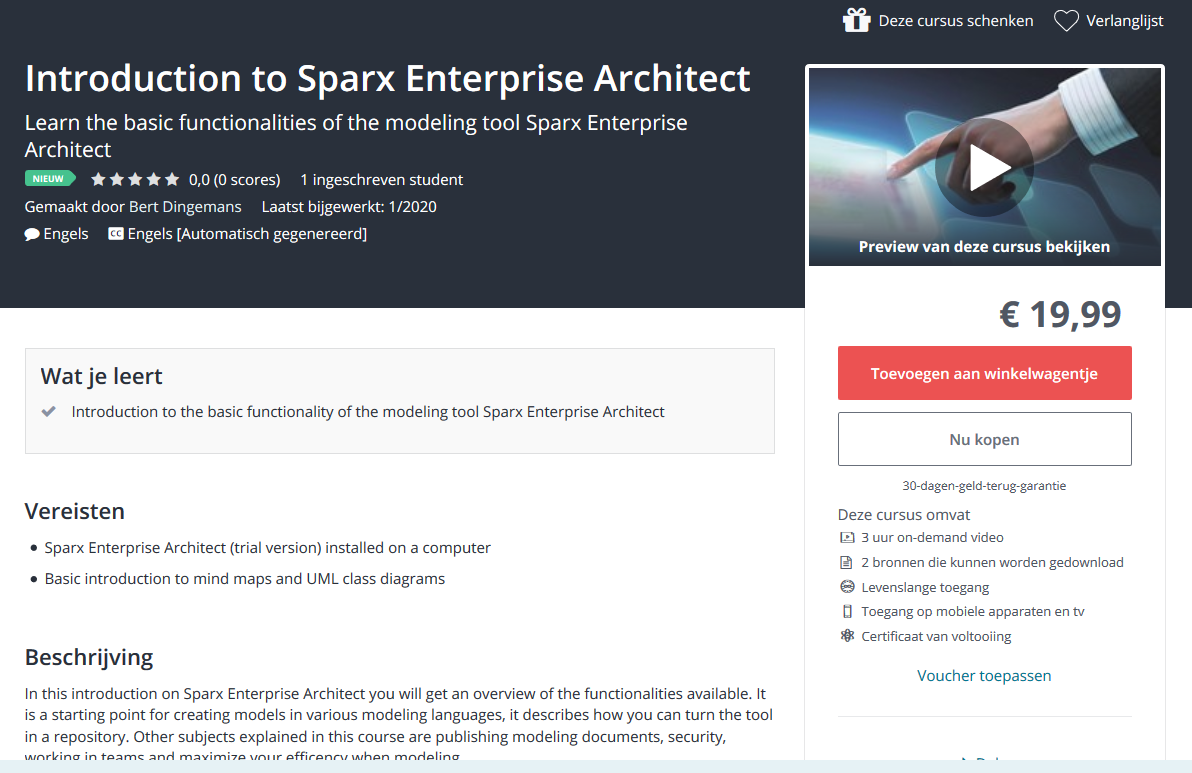
Udemy is an online learning environment where you can register for this online training course. This Enterprise Architect has almost 3 hours of training videos in a logical order for novice Enterprise Architect modelers. The course has five sections describing the most relevant features for modelers new in Enterprise Architect. The basics of the repository, the browser, diagrams and elements are described in video lectures. In the last sections we give an overview on publishing and reporting and using Enterprise Architect in modeling teams. Every section has a shore self test with multiple choice questions.
When registering for this online training on Udemy you get a lifetime access to the training videos and material. The material includes a sample repository used in the training as an eapx file. When you are interested please feel free to watch the introduction video on the webpage accessable via the URL above.